

TL;DR: Semrush is an all-in-one SEO and digital marketing platform with 25.4 billion keywords across 142 country databases. This complete Semrush tutorial covers every tool — from the Keyword Magic Tool to Site Audit to Backlink Analytics — with step-by-step workflows, real screenshots, and a dedicated video walkthrough for each section.
I have tested more than 50 SEO tools with my own money over the past 15 years. Semrush is the one I keep coming back to.
Not because it is perfect. Not because it is cheap. But because it is the most complete SEO toolkit for someone who wants keyword research, competitor analysis, technical audits, content optimization, backlink intelligence, and PPC research in one platform.
This is the complete Semrush tutorial I wish existed when I first started. I cover every major tool with step-by-step instructions and embed the dedicated video tutorial for each section. If you are searching for a proper Semrush guide that goes beyond surface-level button clicks, this is it.
How To Set Up Semrush Projects (Start Here)
Before you touch any tool in Semrush, set up a project. A project connects your domain to all the personalized tools: Position Tracking, Site Audit, On-Page SEO Checker, Backlink Audit, and Link Building. Without a project, you can only use standalone tools with no data continuity between them.
How to create your first project:
- Click the Projects tab in the left sidebar
- Click Create New Project
- Enter your domain name only — no https://, no www, no trailing slash. Just
yourdomain.com - Click Create Project
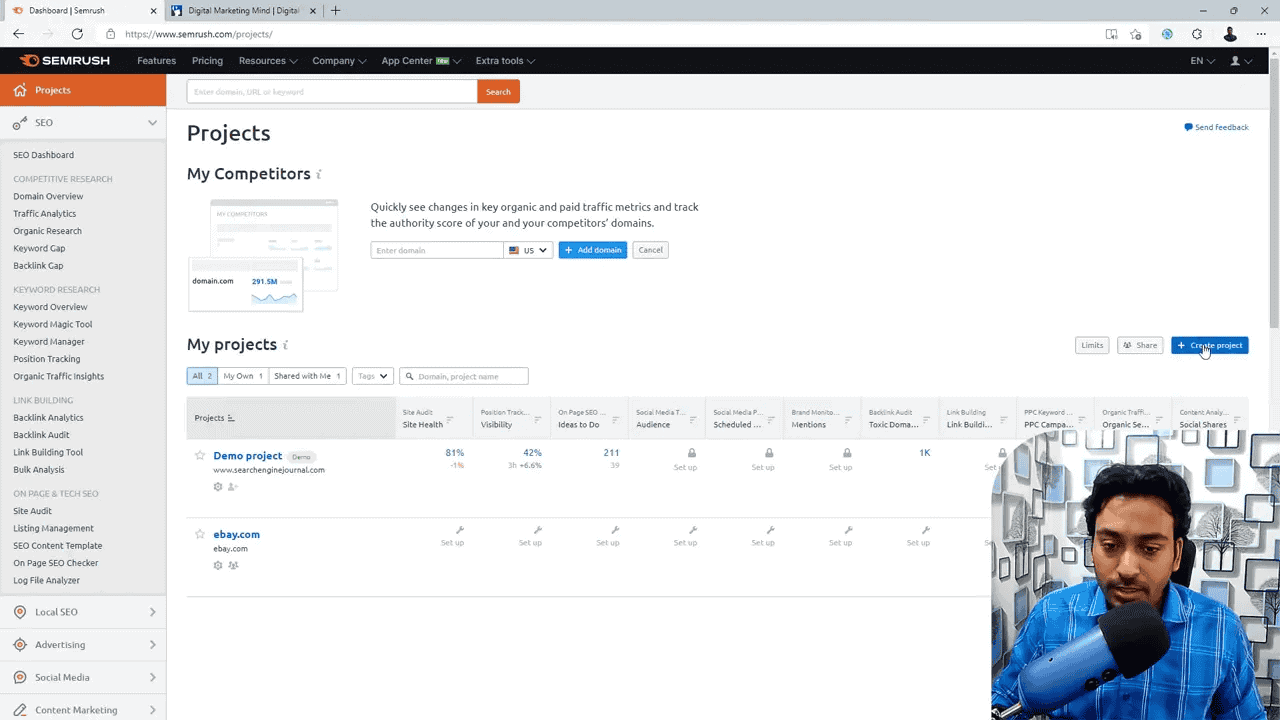
Once the project is created, Semrush shows a dashboard with setup tiles for each tool. Connect Google Analytics and Google Search Console here — this integration pulls your actual traffic data into Semrush reports.
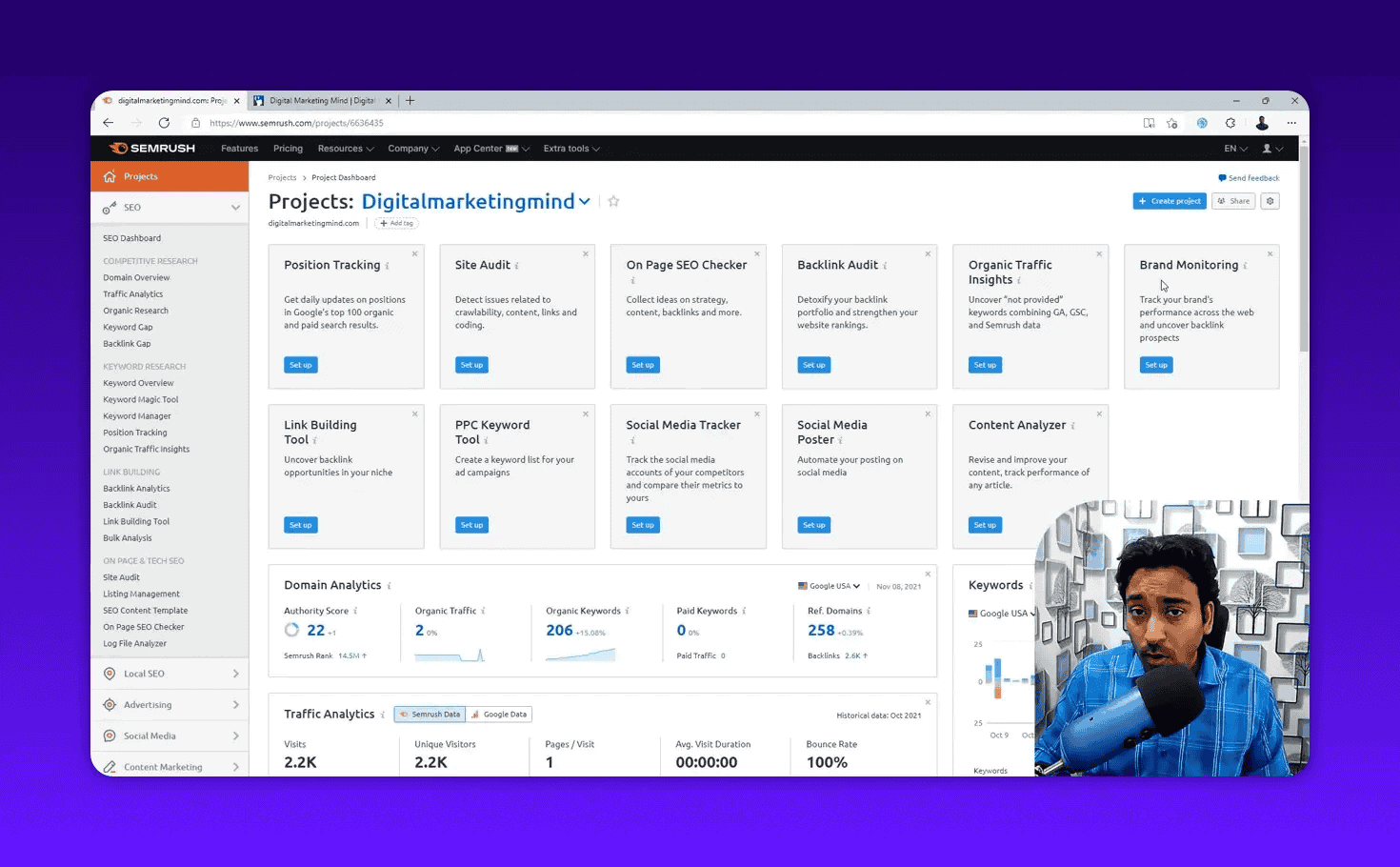
What each project tool does:
| Tool | Purpose |
|---|---|
| Position Tracking | Monitor keyword rankings daily |
| Site Audit | Crawl your site for 140+ technical issues |
| On-Page SEO Checker | Compare specific pages against target keywords |
| Backlink Audit | Identify and disavow toxic backlinks |
| Link Building Tool | Find prospects and manage outreach |
| Organic Traffic Insights | Reveal “(not provided)” keywords from GA |
| Brand Monitoring | Track mentions of your brand across the web |
| Content Analyzer | Measure social engagement for published content |
Pro Tip: If you manage multiple sites, name each project clearly. Descriptive project names save real time when switching between dashboards.
For the full walkthrough: How to Set Up Semrush Projects.
How Does Semrush Work? Understanding the Data
Before walking through each tool, understand one fundamental truth about SEO tools: the data is an educated estimate.
Google does not share its algorithm or raw search data. Semrush crawls the web, tracks search results across 142 country databases, and uses its own algorithms to estimate search volumes, keyword difficulty, traffic values, and rankings.
That said, Semrush has 25.4 billion keywords across 142 geo databases — one of the largest in the industry. When I cross-reference Semrush estimates with my actual Google Search Console data, the directional accuracy is reliable enough for business decisions.
Key rules when using Semrush data:
- Always select the correct target country. Results vary dramatically between the US, UK, India, and other markets.
- Desktop and mobile data differ significantly. Check both and prioritize based on where your audience browses.
- Treat search volume as a range. If Semrush says 500 searches per month, the real number could be 300 to 800. Use it for comparison, not precision.
- Cross-reference with GSC. Google Search Console shows actual clicks and impressions. Use Semrush for discovery; GSC to validate what is working.
How Do You Do Keyword Research in Semrush?
Semrush offers five dedicated keyword research tools for discovering thousands of opportunities, evaluating difficulty and volume, and organizing keywords into content clusters.
How To Use the Keyword Overview Tool
Keyword Overview is the starting point for evaluating any keyword. Enter a keyword, select your target country, and Semrush gives you a complete snapshot in seconds.
What you see:
| Metric | What It Tells You |
|---|---|
| Search Volume | Estimated monthly searches (desktop + mobile separately) |
| Keyword Difficulty (KD%) | How hard it is to rank organically (0–100%) |
| CPC | Cost per click for Google Ads |
| Competitive Density | How many advertisers are bidding (0–1.0 scale) |
| Search Intent | Informational, Commercial, Transactional, or Navigational |
| SERP Features | Featured snippets, video carousels, People Also Ask |
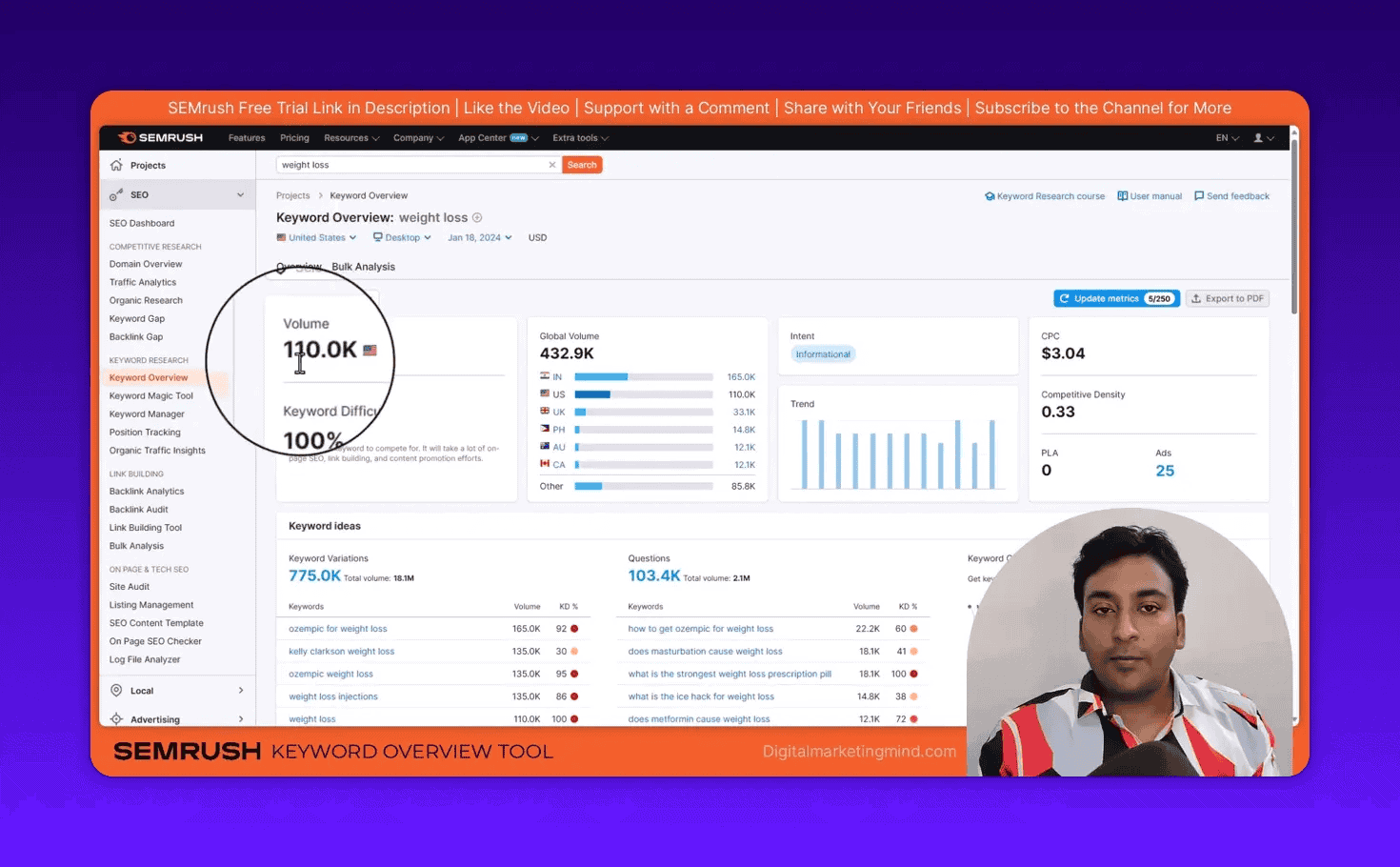
You can enter one keyword or up to 100 keywords in bulk. The bulk mode is useful when you have a large list to evaluate quickly.
What is Competitive Density in Semrush? Competitive density is a score from 0 to 1.0 showing how many advertisers bid on a keyword in Google Ads. A score close to 1.0 means heavy advertiser competition. High competitive density often signals strong commercial value for organic SEO — advertisers only spend money on keywords that convert.
For the complete breakdown: Semrush Keyword Overview: How To Evaluate Any Keyword.
How To Use the Keyword Magic Tool
The Keyword Magic Tool is the single most powerful feature in Semrush for keyword discovery. This is where you go from one seed keyword to thousands of ranked opportunities.
Step-by-step workflow:
- Go to Keyword Research > Keyword Magic Tool
- Enter your seed keyword (for example, “weight loss” or “CRM software”)
- Select your target country
- Click Search
The default view shows Broad Match results. Here is a tip most Semrush tutorials skip: click All Keywords instead of Broad Match. This returns significantly more results — in my testing, switching from Broad Match to All Keywords more than doubled the keyword count for “weight loss.”
My Profitable Keyword Filter (3-Step Method):
This is the exact workflow I use for every client to find keywords that convert into revenue:
- Set Word Count to 5+ words. Longer phrases indicate higher purchase intent. Someone searching “best CRM software for small business under $50” is closer to buying than someone searching “CRM.”
- Set Keyword Difficulty to Very Easy (0–14%) or Easy (15–29%). This filters out keywords dominated by high-authority sites. New and mid-size sites can realistically rank for these without thousands of backlinks.
- Filter by Search Intent: Commercial or Transactional. These are the keywords that turn into customers, not just pageviews.
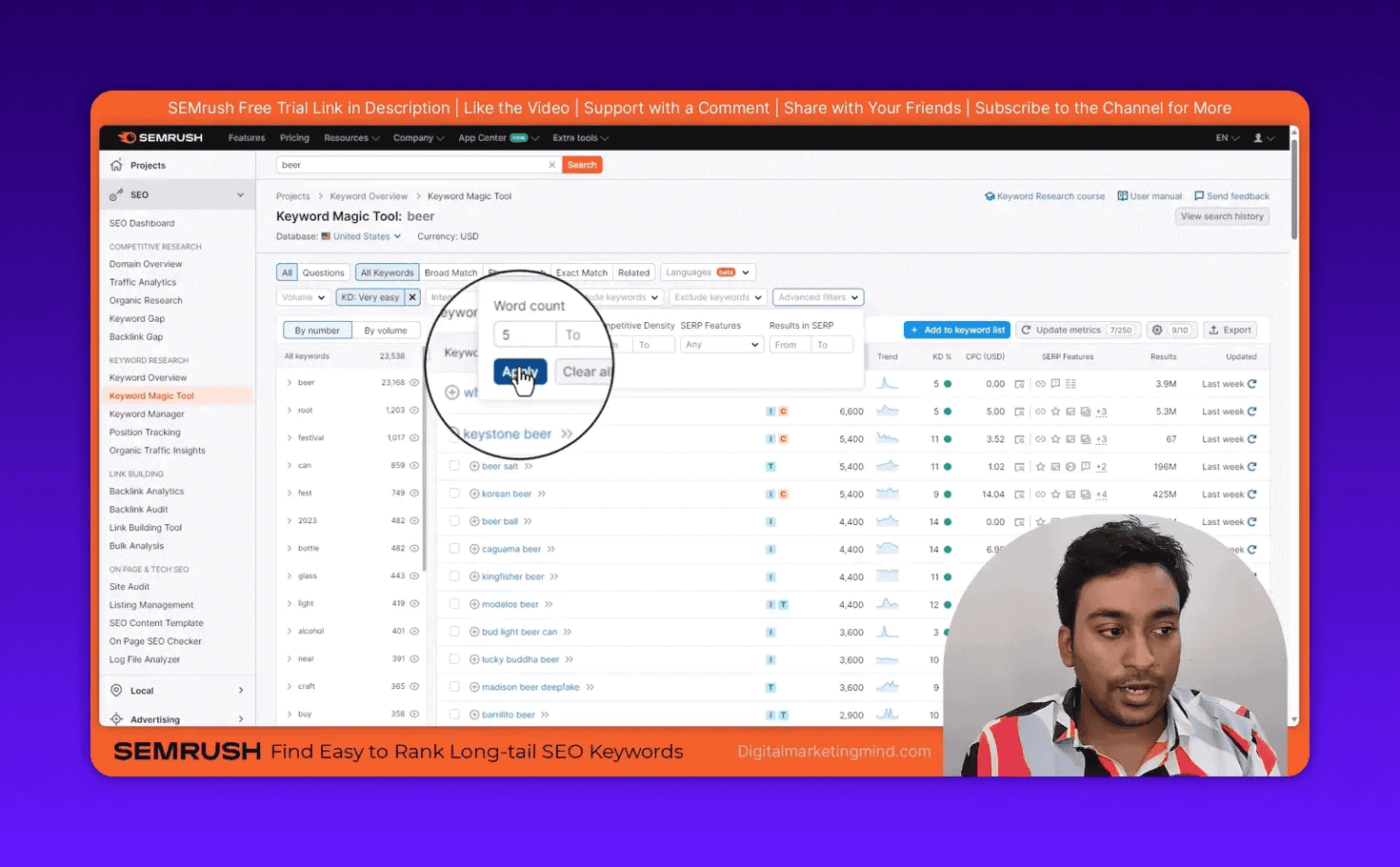
Other useful features:
- Questions tab: Filter to show only question-based keywords — ideal for FAQ sections and featured snippet targeting
- Groups panel: The left sidebar groups related keywords into subtopics. Drill into groups to find clusters
- SERP Features filter: Filter for keywords where video carousels or featured snippets appear
For the full deep-dive: Semrush Keyword Magic Tool Guide.
How To Find Easy-to-Rank Long-Tail Keywords
Long-tail keywords (4+ words) convert better and are easier to rank for than short head terms. My exact Semrush workflow:
- Open Keyword Magic Tool with your seed keyword
- Switch to All Keywords (not Broad Match)
- Set Word Count: 4+
- Set KD%: 0–29% (Very Easy + Easy range)
- Set Intent: Commercial + Transactional
- Sort by Volume descending to find highest-volume easy wins first
For the complete guide: How To Find Easy-to-Rank Long-Tail Keywords With Semrush.
How To Use the Keyword Manager for Clustering
Once you have found keywords, you need to organize them. The Keyword Manager groups related keywords into clusters so you can plan content strategically.
Two ways to use it:
- Auto-collect mode: Enter up to 5 seed keywords and Semrush automatically finds and clusters related keywords — suggesting pillar pages, supporting content ideas, and internal linking opportunities.
- Manual list mode: Create a list and add keywords from Keyword Overview, Keyword Magic Tool, or paste from a spreadsheet. Each list holds up to 2,000 keywords.
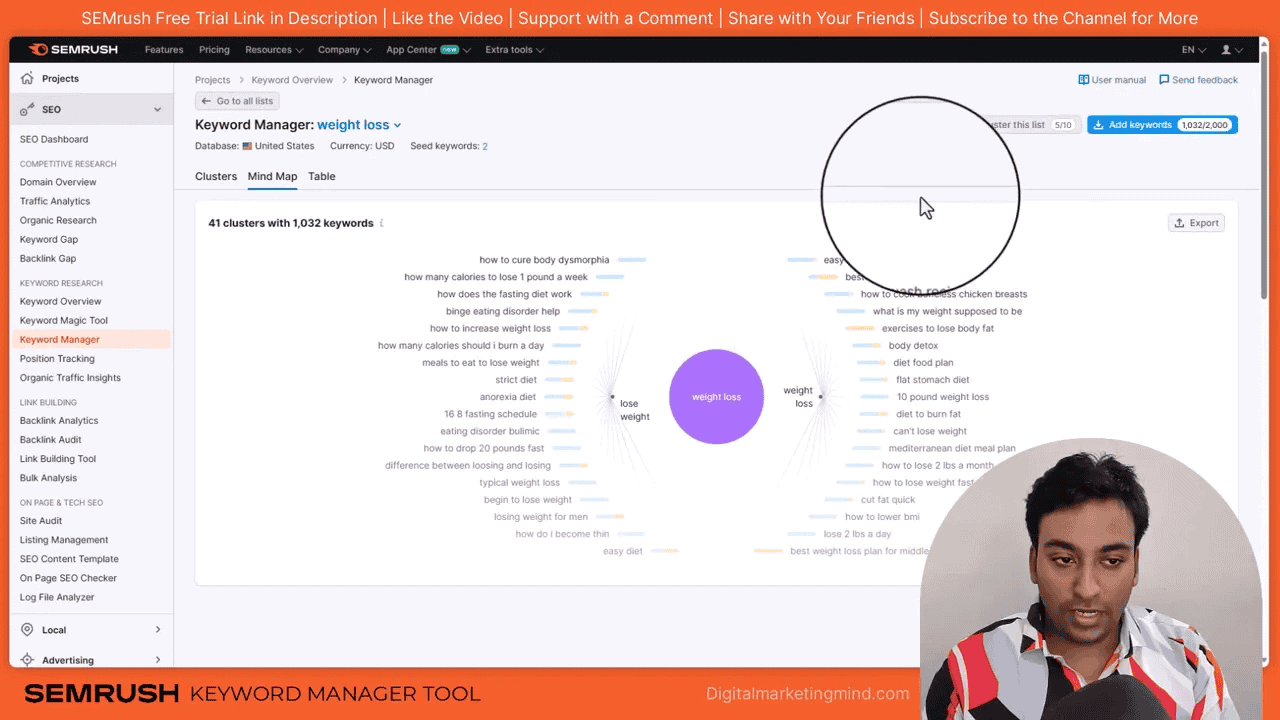
Why clustering matters: Instead of writing 10 articles targeting variations of the same keyword (and competing against yourself), clustering shows you which keywords belong on a single page and which need separate dedicated content.
For the dedicated guide: Semrush Keyword Clusters.
How Do You Analyze Competitors in Semrush?
Semrush’s competitive research tools let you reverse-engineer any competitor’s keyword strategy, traffic sources, and content gaps. Stop guessing what works — let your competitors test keywords and spend money on ads, then use Semrush to steal that intelligence.
How To Use Organic Research (Competitor Keyword Spying)
Instead of starting with a seed keyword (guesswork), start with a competitor’s domain and see exactly what they rank for.
Workflow:
- Go to Competitive Research > Organic Research
- Enter a competitor’s domain, subdomain, or specific URL
- Select your target country
- Click Search
You instantly see every keyword that competitor ranks for, which pages drive the most traffic, estimated traffic cost, and how rankings have changed over time.
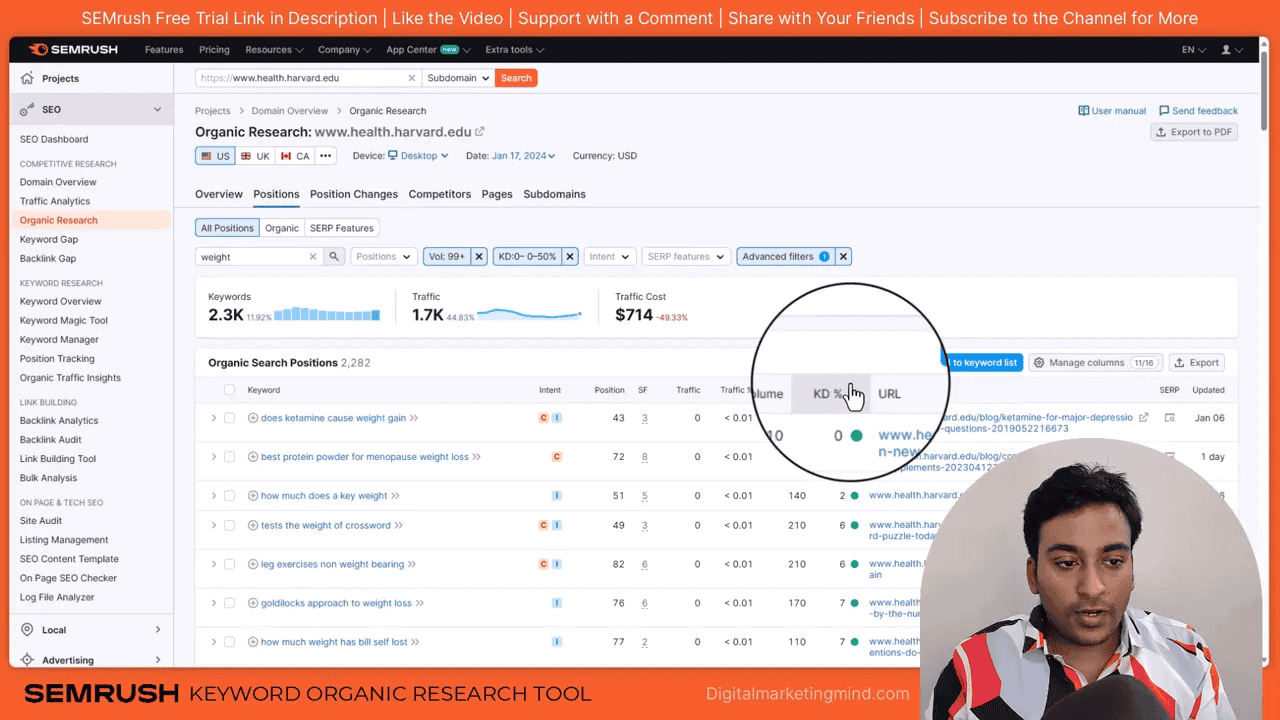
Filter by position to find quick wins: Sort competitor keywords by position and filter to positions 4–20. These are keywords where someone is almost ranking in the top 3 — if a competitor is weak at position 8, you can outrank them with better content.
One URL can rank for thousands of keywords. When I analyze competitor pages, I look at the URL level, not just the domain level. A single blog post ranking for 500 keywords tells me that topic deserves comprehensive coverage.
For the full walkthrough: Semrush Organic Research: How To Steal Competitor Keywords.
How To Use the Keyword Gap Tool
The Keyword Gap tool answers: what keywords are your competitors ranking for that you are not?
Step-by-step:
- Go to Competitive Research > Keyword Gap
- Enter your domain in the first field
- Add up to 4 competitor domains
- Select comparison level: root domain, subdomain, exact URL, or subfolder
- Choose the dataset: organic, paid, or PLA keywords
- Click Compare
Focus on two filters:
- Weak: Keywords where competitors rank top 10 but you rank much lower. These are winnable because you already have ranking signal.
- Untapped: Keywords competitors rank for that you have not targeted at all. These are new content opportunities.
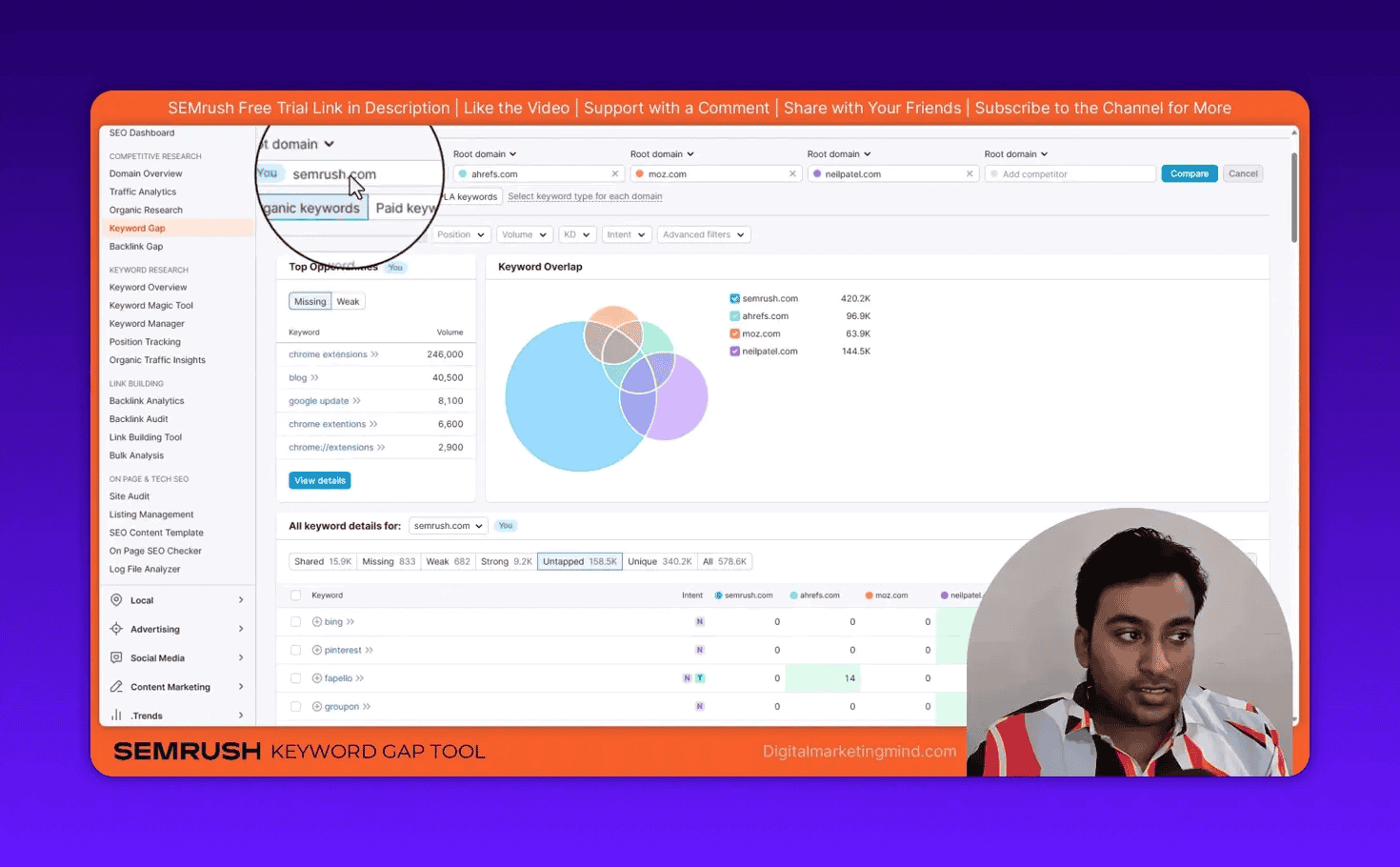
For more detail: Semrush Keyword Gap: Compare Competitor Keywords Side-by-Side.
The Reddit Keyword Research Hack
Reddit ranks for over 129 million keywords in Semrush’s database. Many are long-tail, question-based keywords where Reddit threads rank simply because no one else has created dedicated content for them.
Workflow:
- Go to Competitive Research > Organic Research
- Enter
reddit.comas the domain - Filter by Keyword Difficulty: Very Easy (narrows 129M to ~15 million)
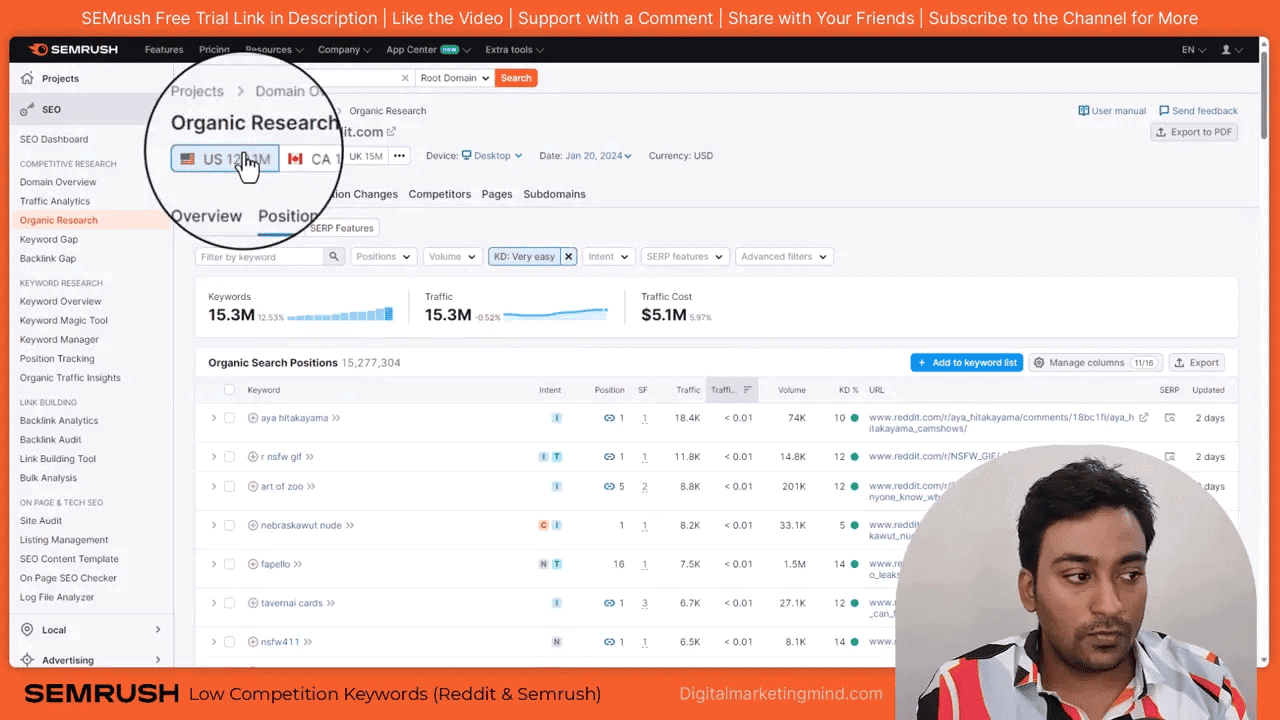
- Filter by Intent: Informational
- Set Word Count to 5+ words
- Search for keywords relevant to your niche
Create a dedicated article answering that question, and you have a realistic chance of outranking Reddit.
Complete guide: How To Find Low-Competition Keywords Using Reddit and Semrush.
Domain Overview and Traffic Analytics
Domain Overview gives you a high-level snapshot of any website: Authority Score (0–100), total organic keywords, estimated organic traffic, backlink count, and top-performing pages. I use this as a quick screening step before diving deeper — if a competitor has an Authority Score of 85 and you are at 25, focus on their long-tail keywords, not their head terms.
Traffic Analytics shows estimated visit data for any domain: total visits, unique visitors, pages per visit, average visit duration, bounce rate, and desktop vs. mobile split.
Important: Full Traffic Analytics requires the Semrush Trends add-on (sold separately). Without it, you only see worldwide data for a one-month window.
How To Track Your Rankings
Position Tracking Setup and Workflow
The Position Tracking tool monitors your keyword positions daily.
Setup workflow:
- Go to Keyword Research > Position Tracking
- Select your project
- Choose search engine: Google, Bing, or Baidu
- Choose device: Desktop, Mobile, or Tablet
- Select your target location (down to city level)
- Add the keywords you want to track
Why location matters: Rankings are not universal. Someone searching in New York sees different results than someone in London. Set tracking location to match where your actual customers search.
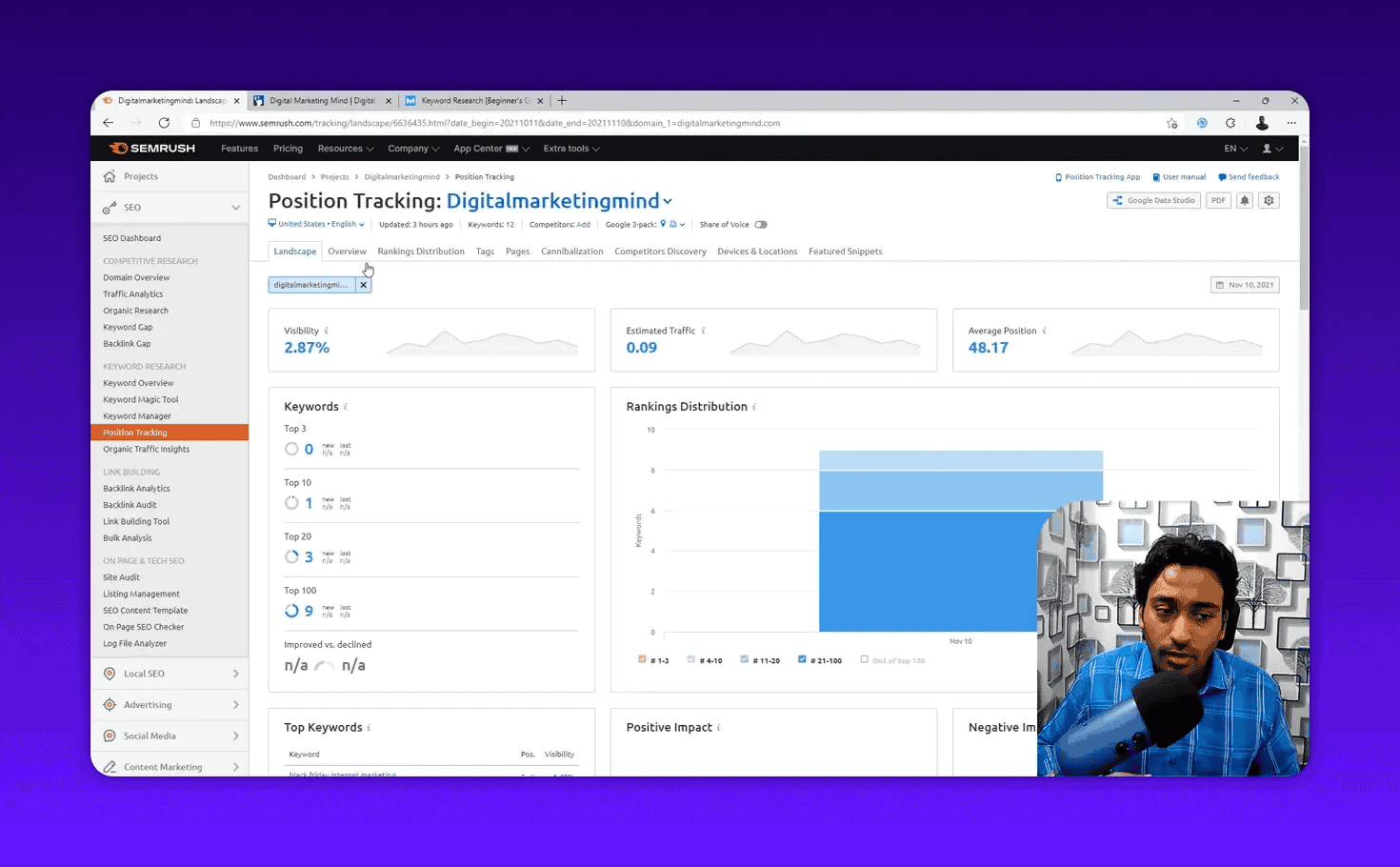
What to monitor:
- Visibility % — percentage of clicks your site captures for tracked keywords. Rising visibility means improving rankings overall.
- Estimated Traffic — projected clicks based on current positions and search volumes
- Rankings Distribution — how many keywords rank in positions 1–3, 4–10, 11–20, 21–50, and 50+
- SERP Features — when your pages appear in featured snippets, People Also Ask, or video carousels
For the full setup guide: Semrush Position Tracking.
How To Reveal “Not Provided” Keywords With Organic Traffic Insights
Google Analytics hides most keyword data behind “(not provided).” Semrush’s Organic Traffic Insights tool solves this by combining data from Google Analytics, Google Search Console, and Semrush’s own database — giving you a per-page breakdown of which keywords drive traffic to each URL.
Setup: Connect Google Analytics and Google Search Console within your Semrush project. Once connected, data populates automatically.
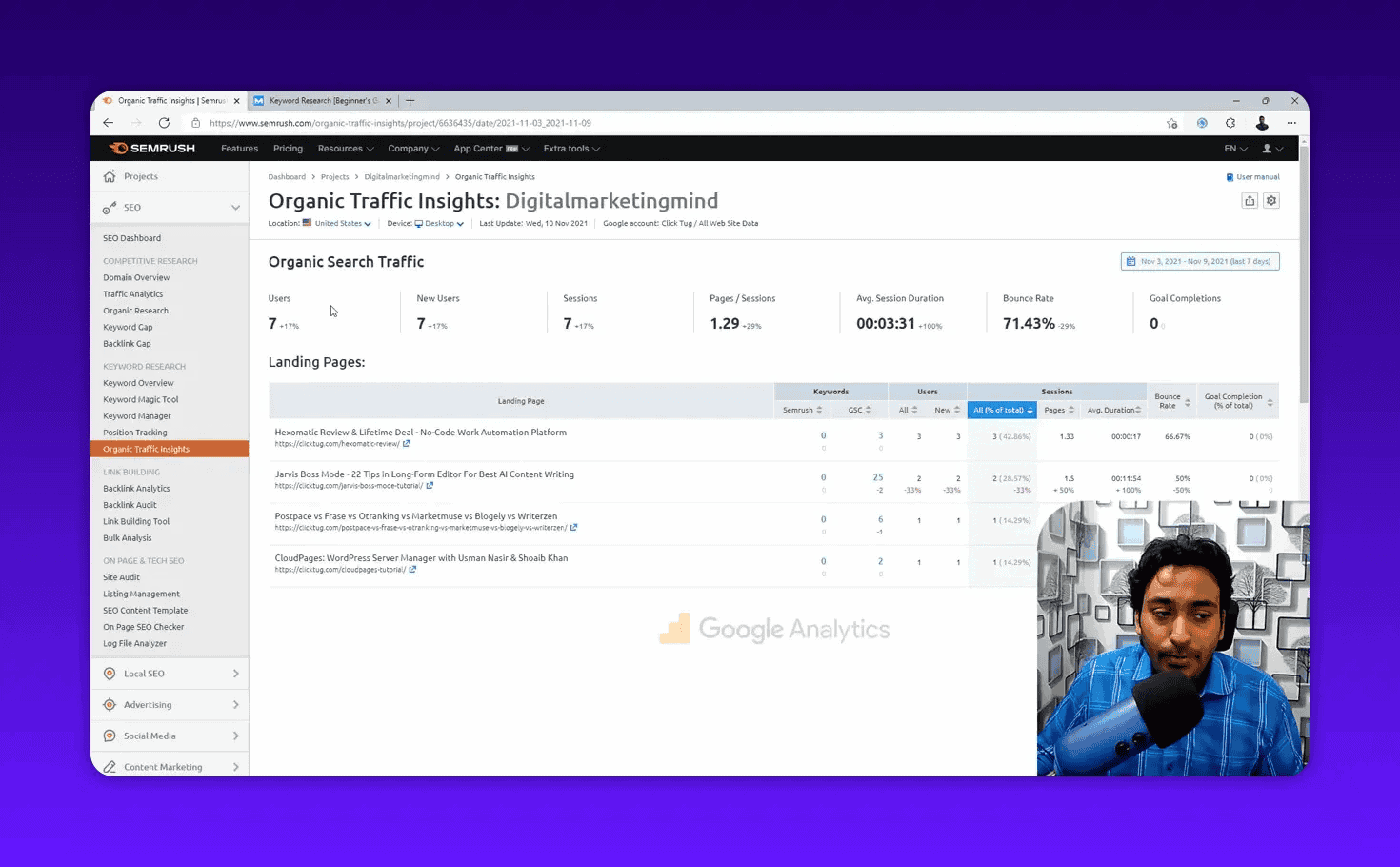
For the walkthrough: Semrush Organic Traffic Insights: Reveal Not Provided Keywords.
How Do You Fix Technical SEO Issues With Semrush?
Semrush’s Site Audit, On-Page SEO Checker, and Log File Analyzer scan your website for over 140 technical issues and provide specific fixes for each one — from broken links to crawl errors to Core Web Vitals problems.
How To Run a Site Audit
The Site Audit tool crawls your website and checks for over 140 distinct technical SEO issues.
Setup:
- Go to On-Page & Tech SEO > Site Audit
- Select your project
- Configure the crawl scope: entire website, subdomain, or subfolder
- Set page crawl limit: 1,000 for small sites, 5,000–10,000 for medium, up to 100,000 for large sites
- Choose crawl source: visit the website directly or crawl via your sitemap
- Click Start Site Audit
How to prioritize results — three severity levels:
- Errors (Red): Critical problems needing immediate attention — broken links, 404 pages, missing title tags, duplicate content
- Warnings (Orange): Significant issues affecting performance — slow-loading pages, missing alt text, thin content
- Notices (Blue): Minor improvements and best practice suggestions
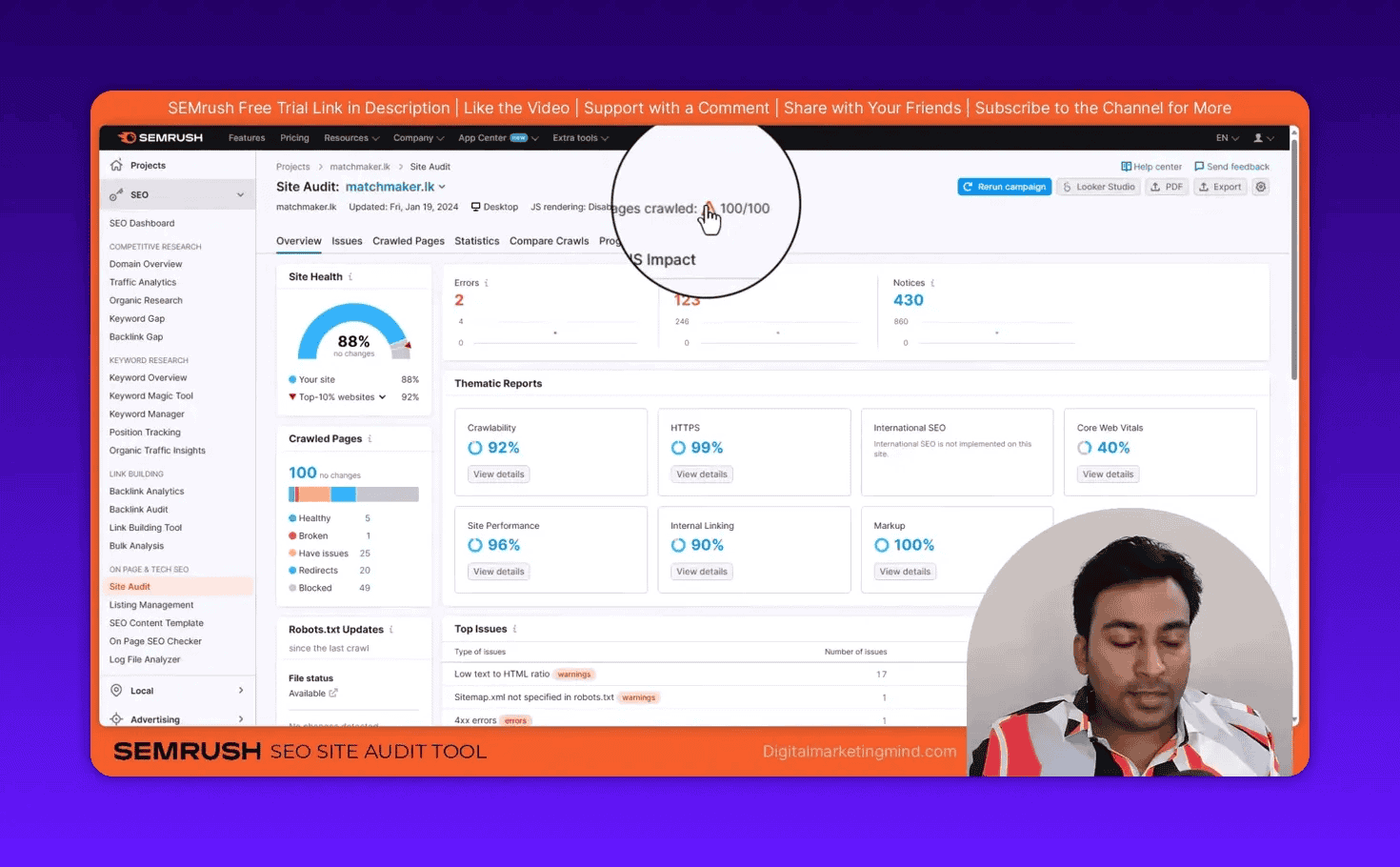
Most common issues I find:
- Missing or duplicate title tags / meta descriptions
- Broken internal links (404 errors)
- Images without alt text
- Pages blocked by robots.txt that should be indexed
- Slow page speed on mobile
- HTTP pages on an HTTPS site (mixed content)
- Orphan pages (no internal links pointing to them)
Schedule automatic weekly crawls so you catch new issues before they accumulate.
For the complete guide: Semrush Site Audit: Technical SEO Guide.
How To Use the On-Page SEO Checker
The On-Page SEO Checker analyzes specific pages against specific target keywords and compares your on-page SEO to what is working for the top 10 Google results — different from Site Audit which checks general technical health.
Setup:
- Go to On-Page & Tech SEO > On-Page SEO Checker
- Select your project
- Set target country and device
- Choose crawl user agent: select Google bot for more accurate results
- Import keywords from Organic Research, Position Tracking, GSC, CSV, or manually
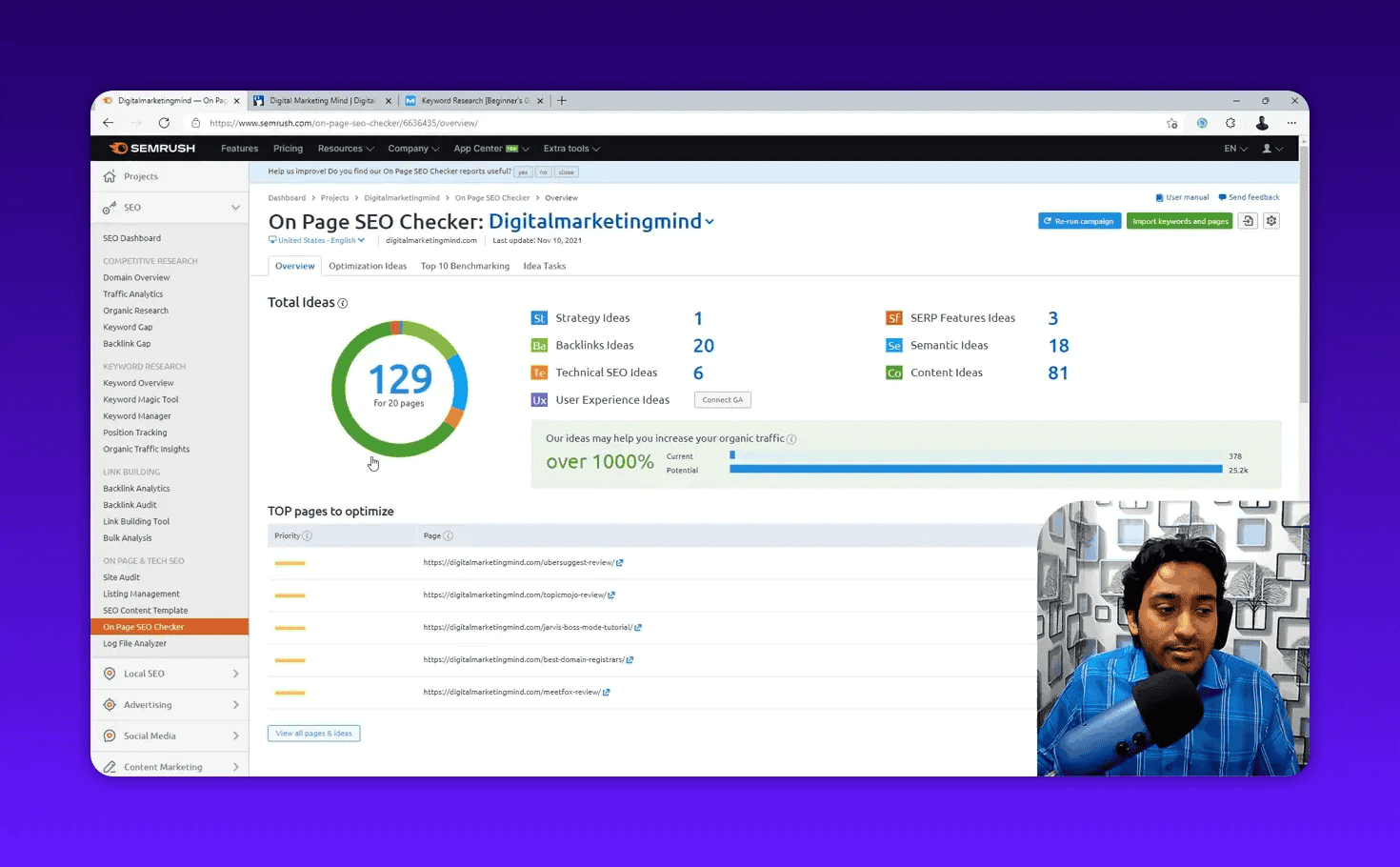
Key recommendation types:
- Strategy ideas: Target a different, better-matching keyword for this page
- Backlink ideas: Sites likely to link to your content based on competitor profiles
- Technical ideas: Page speed, structured data, hreflang improvements
- Content ideas: Semantic terms to add, content length benchmarks, TF-IDF analysis
- SERP features ideas: Schema markup to add for rich results
For the full guide: Semrush On-Page SEO Checker.
How To Use the Log File Analyzer
The Semrush Log File Analyzer shows you exactly how search engine bots interact with your website — which pages Googlebot visits, how often, and which it misses.
How to use it:
- Obtain your server log file from hosting (in cPanel, go to Raw Access)
- Go to On-Page & Tech SEO > Log File Analyzer
- Upload your log file
- Click Start Log File Analyzer
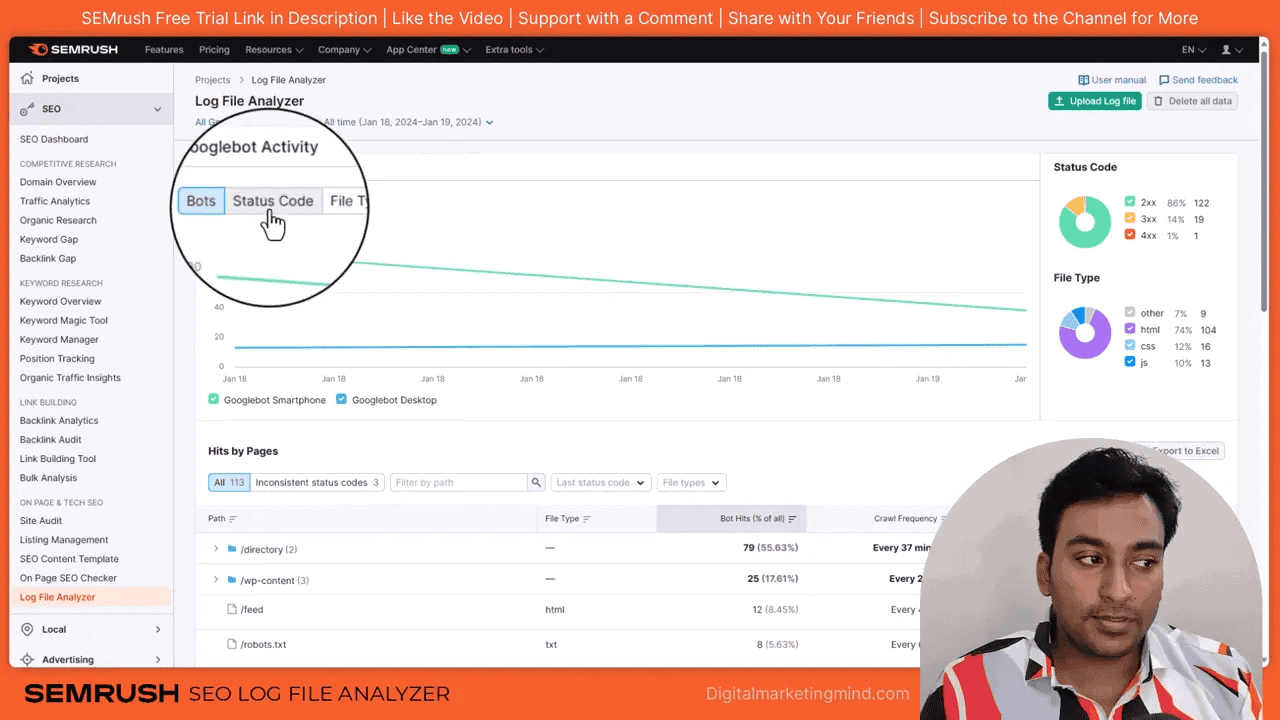
What to look for:
- Pages Googlebot visits frequently — usually your most-linked pages
- Pages Googlebot never visits — may be orphaned or blocked
- Spikes in Googlebot activity — often correlate with new backlinks or content updates
- Non-Googlebot crawlers consuming bandwidth — sometimes scrapers slowing your site
This is an advanced tool but invaluable for large sites with crawl budget concerns.
For the detailed guide: Semrush Log File Analyzer: Analyze Googlebot Crawl Behavior.
How Do You Create SEO Content With Semrush?
Semrush’s Content Marketing Platform generates data-backed content briefs from the top 10 Google results and scores your writing in real-time for readability, keyword usage, tone, and originality.
How To Create Content Briefs With the SEO Content Template
The SEO Content Template analyzes the top 10 Google results for your target keyword and generates a data-backed content brief — before you write a single word.
What it provides:
- Semantically related keywords to include (LSI keywords)
- Recommended text length based on what top rankers use
- Readability targets
- Backlink benchmarks (how many backlinks top rankers have)
- The top 10 URLs analyzed for your own research
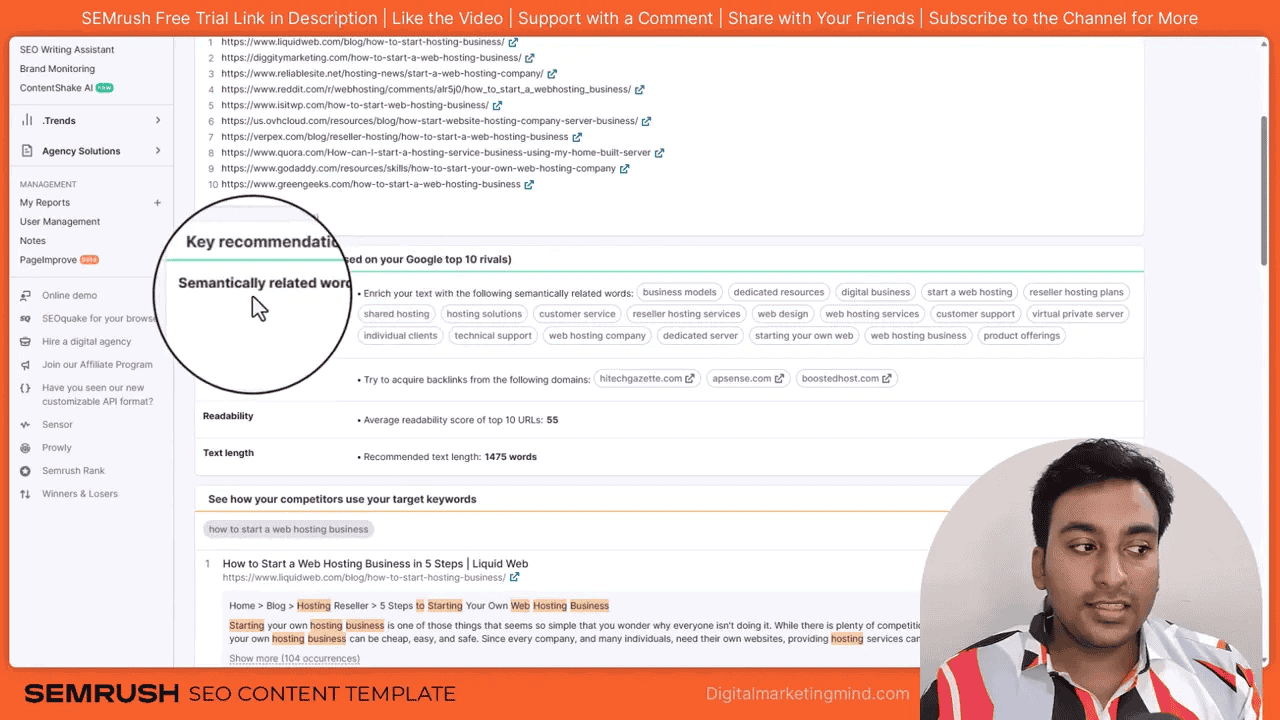
Export to Google Docs (useful for freelance writers) or send directly to the SEO Writing Assistant.
For the guide: Semrush SEO Content Template: Create Data-Backed Article Briefs.
How To Optimize Content With the SEO Writing Assistant
The SEO Writing Assistant grades your content in real-time across four dimensions:
- Readability: Target reading level (I aim for 5th–8th grade — simpler language reaches a wider audience)
- SEO: Keywords placed correctly, semantic keywords used, content long enough vs. top competitors
- Tone of Voice: Consistent tone with built-in AI rephrasing
- Originality: Plagiarism checker flagging passages that match existing content
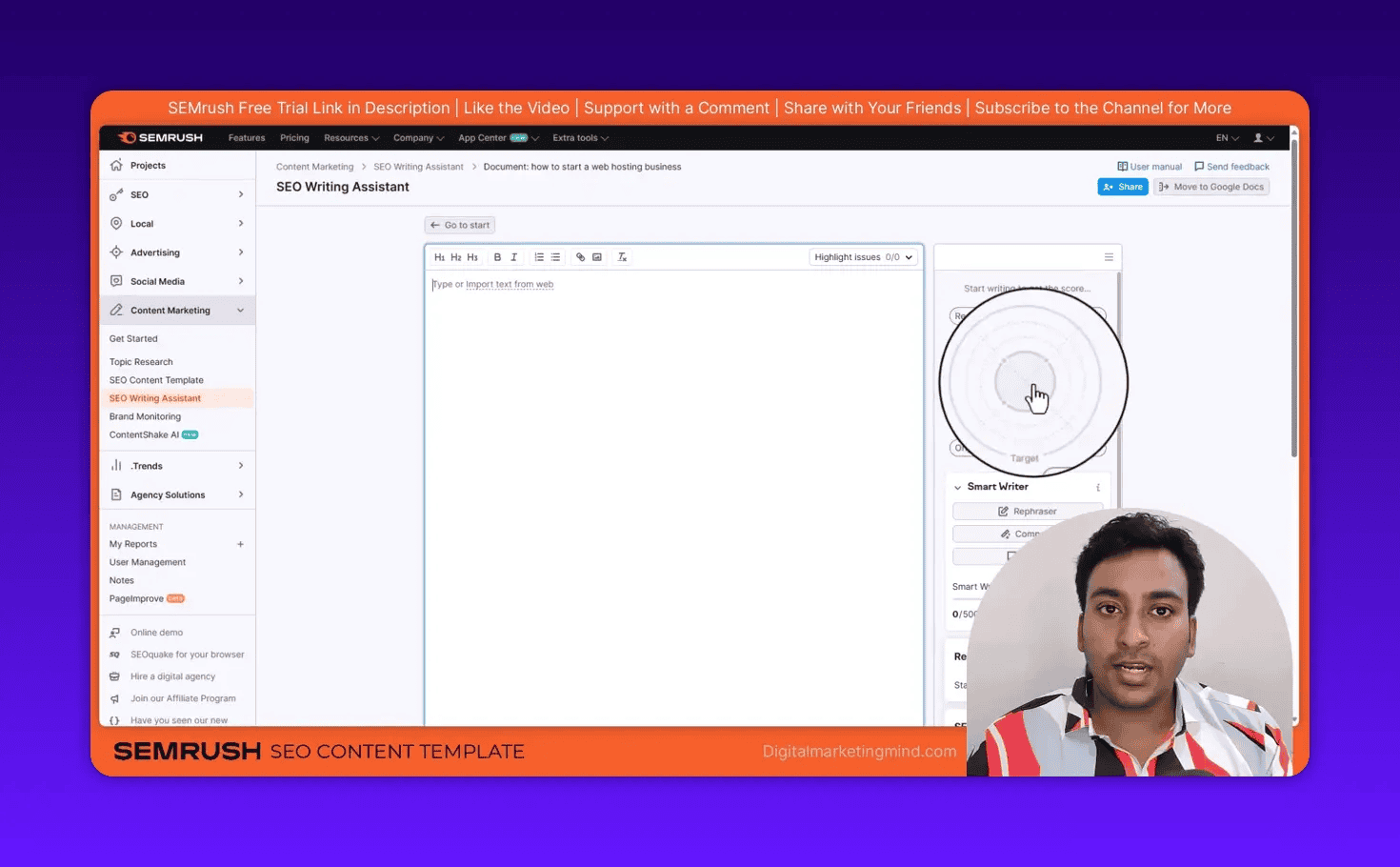
Integrates with Google Docs and the WordPress editor via add-ons.
For the full tutorial: Semrush SEO Writing Assistant.
How Do You Build Backlinks With Semrush?
Semrush provides four dedicated tools for analyzing competitor backlink profiles, auditing your own links for toxicity, finding new link prospects, and managing outreach — all within the platform.
How To Use Backlink Analytics
Backlink Analytics is your starting point for understanding any site’s backlink profile.
Workflow:
- Go to Link Building > Backlink Analytics
- Enter a domain and click Analyze
- Optionally add up to 3 competitor domains for side-by-side comparison
Key metrics:
- Referring domains count (unique websites linking to the target)
- Total backlinks (individual links, including multiple from the same domain)
- New and lost backlinks over time
- Anchor text distribution
- Follow vs. nofollow ratio
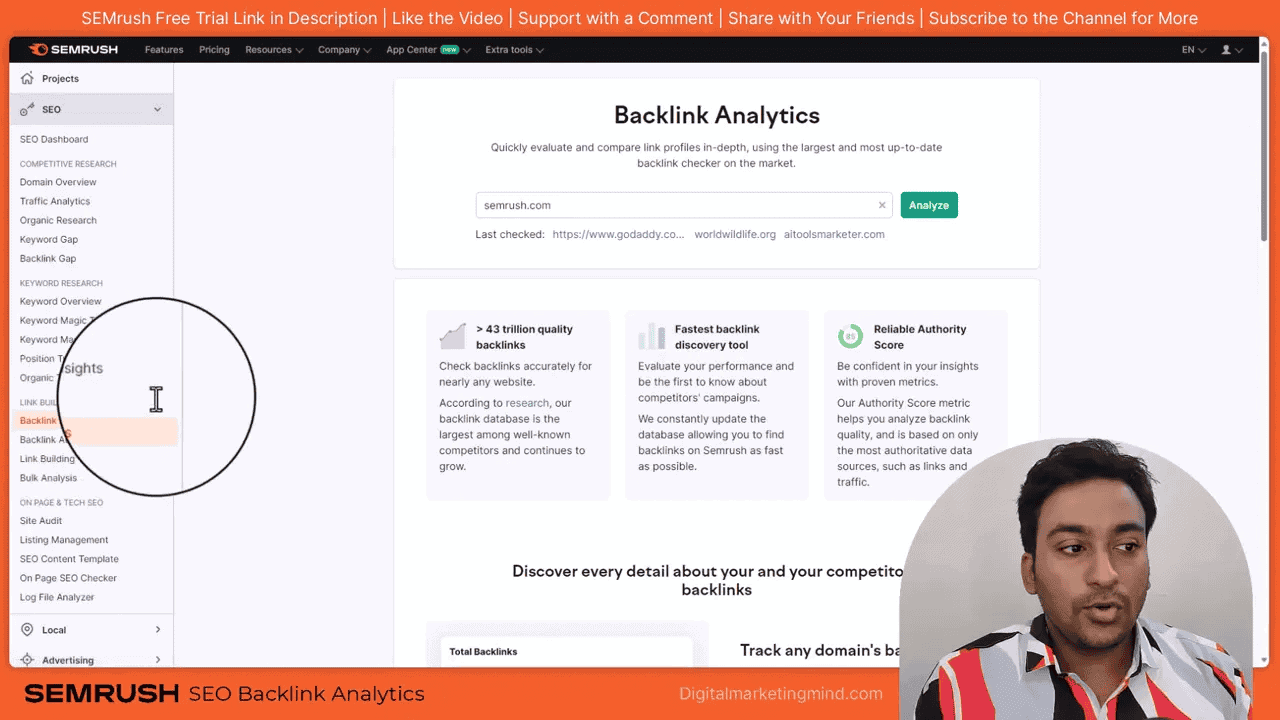
I use this primarily for competitor backlink research. When I see a competitor getting links from a specific type of site — industry directories, resource pages, guest post roundups — it tells me where to focus my own link building.
The “New and Lost” tab is especially useful — a competitor suddenly gaining 50 new referring domains in one month usually means they published a linkable asset or got a PR mention. Finding out what caused that spike gives you a playbook to replicate.
For the complete guide: Semrush Backlink Analytics.
Also see: Semrush Bulk Backlink Analysis: Compare Multiple Competitors at Once.
How To Clean Up Toxic Backlinks With the Backlink Audit
Not all backlinks help your site. Spammy, low-quality links can actively hurt your rankings. The Backlink Audit identifies toxic backlinks and helps you disavow them.
Setup:
- Go to Link Building > Backlink Audit
- Select your project
- Add up to 10 brand name variations (used to identify branded vs. spammy anchor text)
- Select your domain category
- Click Start Backlink Audit
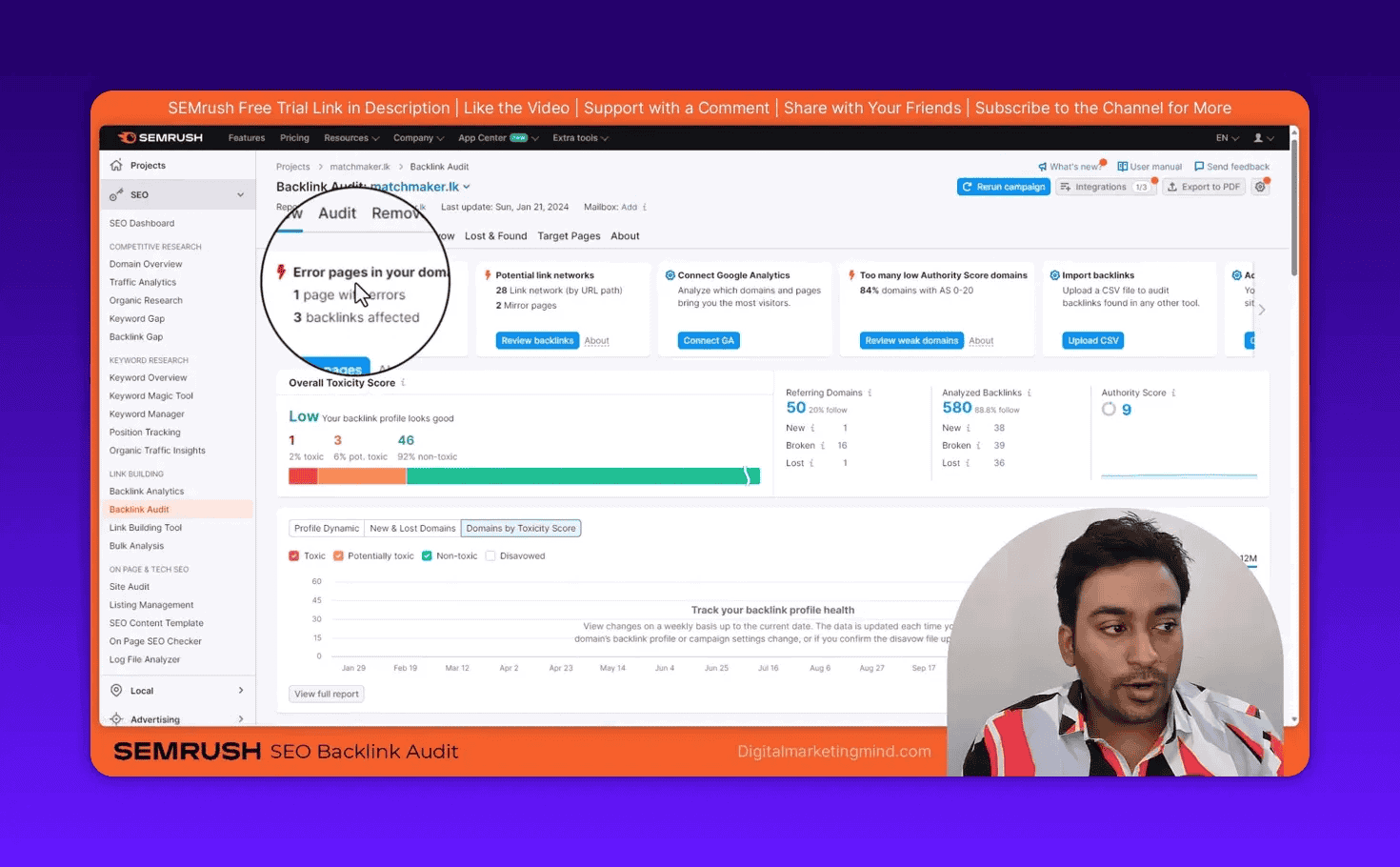
What is a Semrush Toxic Score? The toxic score (0–100) rates how harmful a backlink is likely to be. Semrush evaluates 45+ signals: the linking site’s spam score, anchor text patterns, link farm membership, PBN indicators, and more. Links scoring 45+ are flagged as potentially toxic.
Actions you can take:
- Whitelist safe links you want to keep
- Manually remove obviously bad links (contact the linking site)
- Send toxic links directly to Google’s Disavow tool from within Semrush
Run this audit quarterly, or immediately after any sudden ranking drops.
For the guide: Semrush Backlink Audit: Remove Toxic Backlinks.
How To Build Backlinks With the Link Building Tool
The Link Building Tool turns backlink research into outreach action.
Workflow:
- Go to Link Building > Link Building Tool
- Select your project
- Enter up to 10 target keywords
- Add competitors
- Click Start Link Building
The tool runs four steps: Search prospects → Select best prospects → Start outreach → Track results.
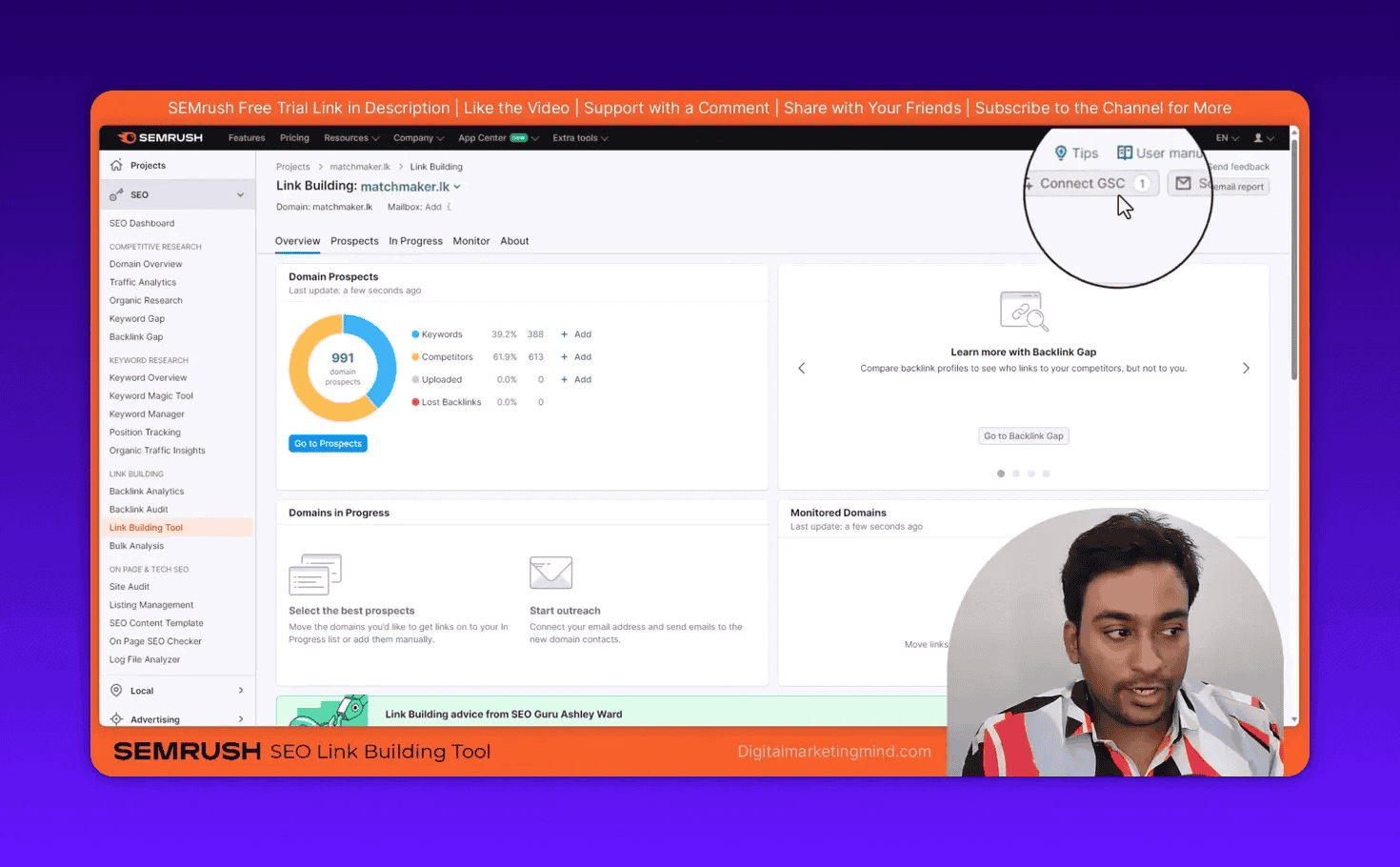
Connect your email (Gmail, Outlook, or Office 365) to send outreach directly from Semrush and track replies and backlink appearances.
For the tutorial: Semrush Link Building Tool: Build Backlinks Step-by-Step.
Semrush Bulk Backlink Analysis
The Bulk Backlink Analysis tool lets you analyze up to 200 domains at once and compare their backlink metrics side-by-side — useful for benchmarking a large group of competitors quickly or screening a link prospecting list to identify the highest-authority targets.
For the guide: Semrush Bulk Backlink Analysis.
How Do You Research Competitor Ads in Semrush?
Semrush’s Advertising Research tools reveal every Google Ads keyword your competitors bid on, which landing pages they use, estimated ad spend, and their Google Shopping (PLA) product strategies.
How To Spy on Competitor Google Ads With Advertising Research
The Advertising Research tool reveals every Google Ads keyword a competitor is bidding on, the landing pages they use, and how much they are likely spending.
Workflow:
- Go to Advertising > Advertising Research
- Enter a competitor’s domain
- Select the target country
- Click Search
You see total ad keywords, estimated ad traffic, traffic cost, and historical data going back up to 2 years.
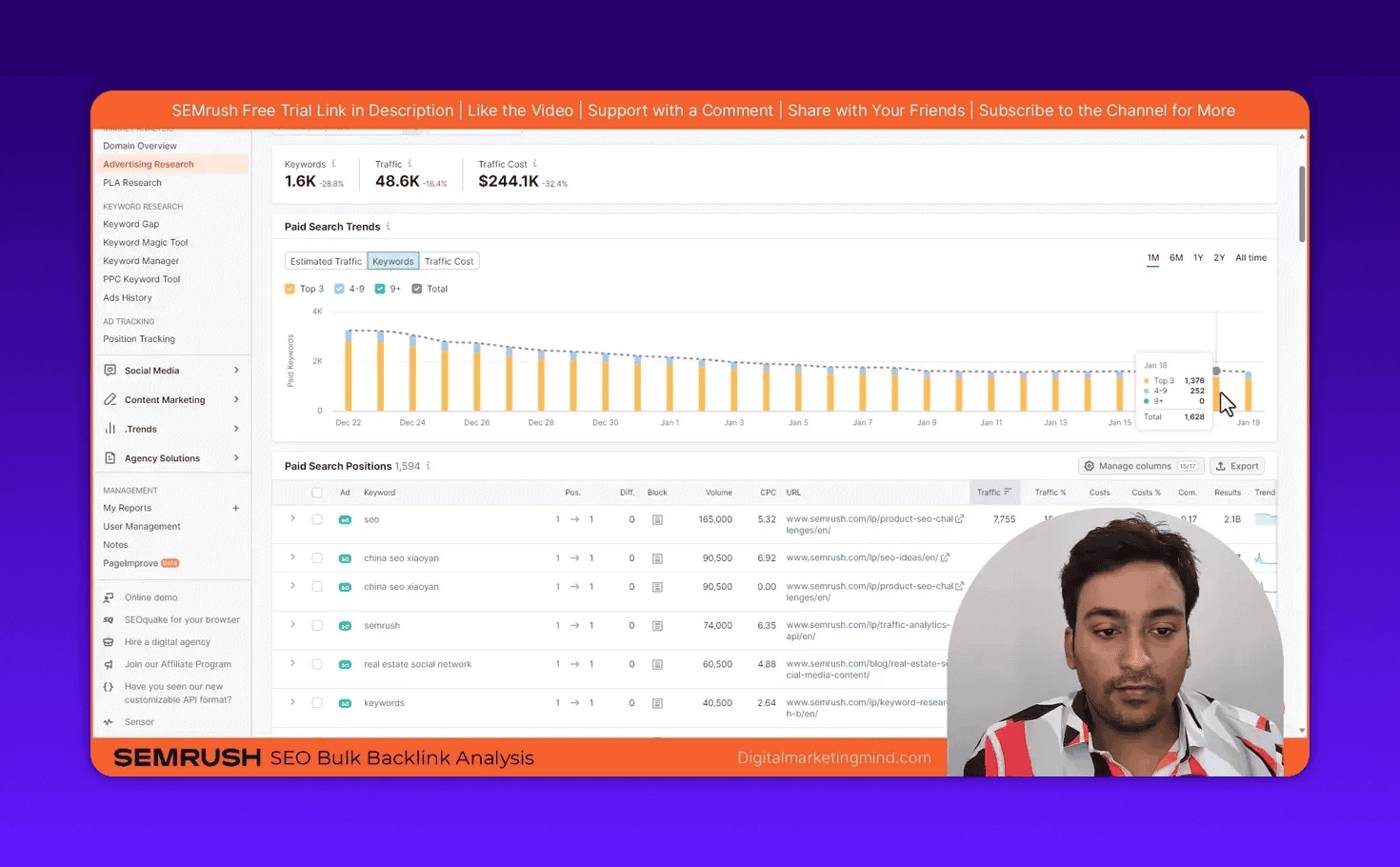
Key insight: If a competitor has been running ads on a keyword for 12+ months, that keyword is likely profitable. This is validated commercial intent you can target with both organic content and your own ads.
The Ad History feature shows every ad copy variant a competitor has tested over time. This is a goldmine — you can see which messaging angles they kept (meaning they converted) and which they dropped.
For the guide: Semrush Advertising Research: Spy on Competitor PPC Campaigns.
How To Research Google Shopping Ads With PLA Research
If you run an e-commerce store, the Semrush PLA Research tool shows which products competitors advertise on Google Shopping, which keywords trigger those ads, and how their PLA strategy has changed over time.
Example: Entering ebay.com shows approximately 1.7 million PLA ads. You can see exactly which product categories they push, which keywords they target, and which competitors overlap.
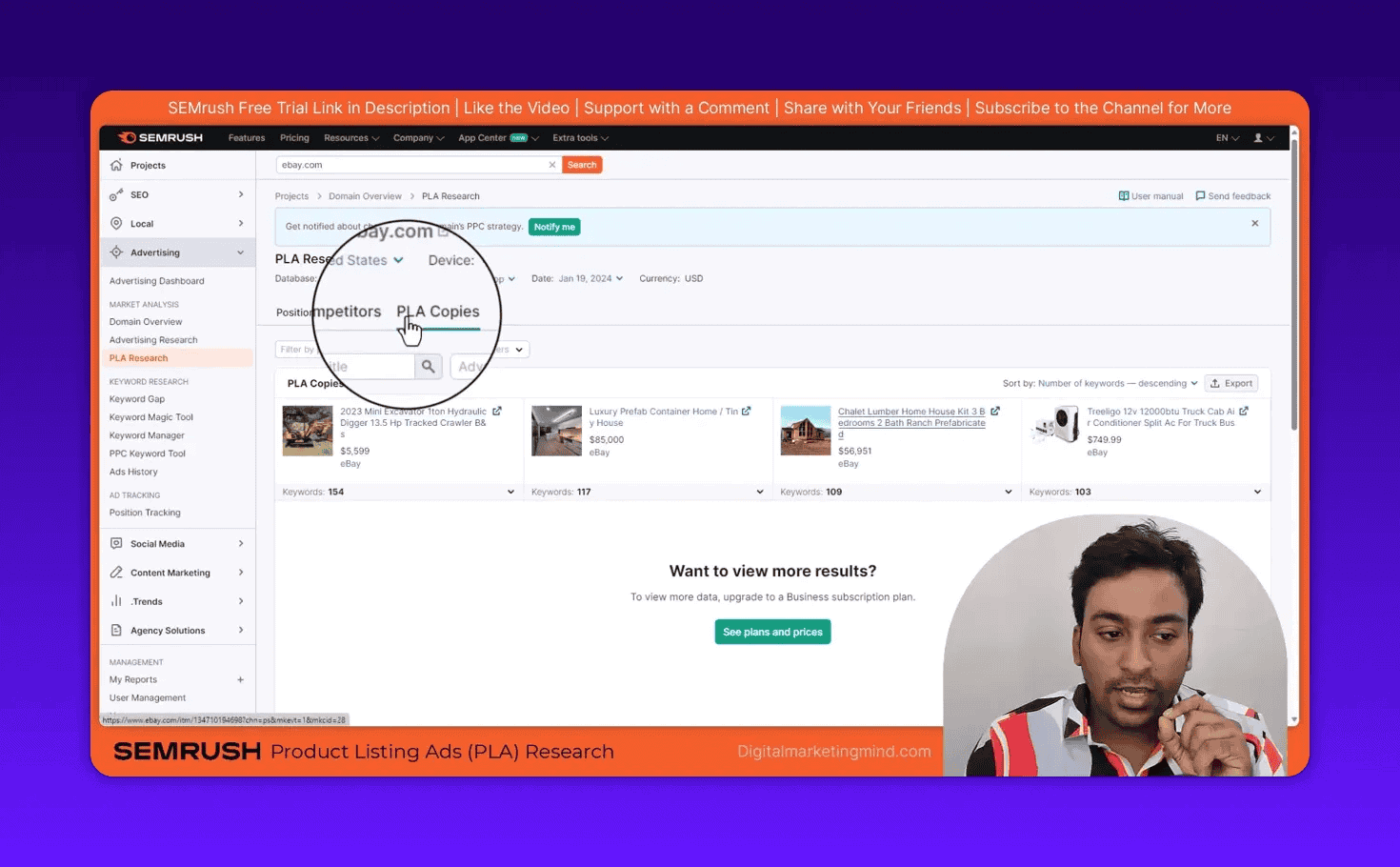
For the full tutorial: Semrush PLA Research: Google Shopping Ads Analysis.
How To Use the PPC Keyword Tool
The PPC Keyword Tool helps you organize, group, and clean up Google Ads keyword lists before launching campaigns.
Key features:
- Cross-group negatives: Identifies keywords appearing in multiple ad groups and suggests them as negatives to prevent internal bid competition
- Keyword grouping: Organizes keywords into ad groups by semantic similarity
- Match type management: Bulk-assign match types (broad, phrase, exact) across all keywords
- Export to Google Ads: Send the cleaned, grouped keyword list directly to Google Ads Editor
For the guide: Semrush PPC Keyword Tool: Organize and Manage Google Ads Keywords.
Semrush App Center and Free Tools
Beyond the core platform, Semrush offers an App Center (semrush.com/apps) with dozens of additional tools — AI apps, social media, content creation, analytics, and e-commerce. Some are free, others cost $35–$169/month extra.
Free apps worth checking: Plagiarism Checker, Persona Report Creator, Instant Keyword Research for Amazon.
Semrush free standalone tools (no subscription needed):
- AI Text Generator: Generate blog titles, paragraphs, and content outlines
- Word Counter: Counts words, characters, sentences, and paragraphs with readability scoring
- Paraphrasing Tool: Rephrase text while keeping the meaning
- Grammar Checker: Catches grammatical errors in your content
For my full walkthrough: Semrush App Center: Hands-On Review.
Semrush Pricing: Which Plan Do You Need?
| Feature | Pro ($139.95/mo) | Guru ($249.95/mo) | Business ($499.95/mo) |
|---|---|---|---|
| Keywords to track | 500 | 1,500 | 5,000 |
| Results per report | 10,000 | 30,000 | 50,000 |
| Projects | 5 | 15 | 40 |
| Historical data | No | Yes | Yes |
| Content Marketing Platform | No | Yes | Yes |
| PLA Research (full) | Limited | Limited | Full |
| API access | No | No | Yes |
My recommendation: The Guru plan is the sweet spot for most business owners and marketing professionals. You get historical data (critical for tracking competitor trends), the Content Marketing Platform, and enough project slots for a portfolio of sites.
Semrush Black Friday Deal: Semrush typically runs their best discounts in November — the Semrush Black Friday offer usually includes 17% off annual plans.
Important: Semrush Trends (full Traffic Analytics) is a separate add-on regardless of plan. It costs extra.
Semrush Integrations You Should Connect
Semrush becomes significantly more powerful when connected to your existing tools:
- Google Search Console — Required for real keyword data validation. Connect on day one.
- Google Analytics (GA4) — Pulls actual traffic and engagement metrics into Semrush reports
- Google Ads — Connects paid campaign data to your keyword research
- Gmail or Outlook — Enables email outreach from the Link Building Tool
- Google Docs — SEO Writing Assistant add-on for real-time content optimization
- WordPress — SEO Writing Assistant plugin for in-editor optimization
- Looker Studio — Import Semrush data into custom dashboards
What Are the Most Common Semrush Mistakes?
After 15 years of using SEO tools and teaching 30,000+ students, I see the same mistakes repeatedly:
-
Trusting keyword difficulty scores blindly. KD is a useful filter, but always do a manual SERP check. “Very Easy” keywords can still be dominated by Reddit, Wikipedia, or government sites.
-
Ignoring search intent. A keyword with 10,000 monthly searches and informational intent will not sell your product. Focus on commercial and transactional intent for revenue-generating content.
-
Only using Broad Match in Keyword Magic Tool. Switch to “All Keywords” to see the full picture — you could be missing more than half of available opportunities.
-
Skipping competitor research. Starting with seed keywords is guesswork. Starting with competitor domains is intelligence. Always check what is already working before creating new content from scratch.
-
Running Site Audit once and forgetting about it. Technical issues accumulate over time. Schedule weekly or biweekly automatic crawls.
-
Not connecting Google Search Console. Without GSC data, you are relying entirely on estimates. Connect it on day one.
-
Confusing Site Audit with On-Page SEO Checker. Site Audit checks general technical health. On-Page SEO Checker compares specific pages against specific keywords. Use both.
-
Ignoring the Keyword Gap tool. Most people only do keyword research from scratch. Keyword Gap shows proven opportunities your competitors are already monetizing.
Frequently Asked Questions
What is Semrush used for?
Semrush is an all-in-one SEO and digital marketing platform used for keyword research, competitor analysis, technical site audits, rank tracking, backlink analysis, content optimization, and PPC research. It has 25.4 billion keywords across 142 country databases.
How do I set up Semrush for the first time?
Start by creating a Project with your domain, then connect Google Search Console and Google Analytics. Run a Site Audit to check your website health, then use the Keyword Magic Tool with your main topic as the seed keyword to find ranking opportunities.
Is Semrush worth it in 2026?
For businesses that depend on organic search traffic, yes. Semrush replaces 5–7 separate tools at a cost of $139.95–$249.95/month. The Guru plan is the sweet spot — it includes historical data and the Content Marketing Platform (SEO Content Template + Writing Assistant).
How accurate is Semrush data?
Semrush data is estimated, not exact. Search volume estimates are directionally accurate but can be off by 30–50% for individual keywords. Use Semrush for discovery and competitive research, then validate decisions with Google Search Console data.
What is competitive density in Semrush?
Competitive density is a score from 0 to 1.0 showing how many advertisers bid on a keyword in Google Ads. A score close to 1.0 means heavy advertiser competition. High competitive density often signals strong commercial value for organic SEO targeting.
What is a Semrush toxic score?
The toxic score (0–100) rates how harmful a backlink is likely to be. Semrush evaluates 45+ signals: the linking site’s spam score, anchor text patterns, link farm membership, PBN indicators, and more. Links scoring 45+ are flagged as potentially toxic and should be reviewed for disavowal.
Does Semrush have a free plan?
Semrush offers a limited free tier with 10 searches per day across most tools. For serious SEO work the free tier is too restrictive, but Semrush also offers a 7-day free trial of the Pro or Guru plan.
What is TF-IDF in Semrush?
TF-IDF (Term Frequency-Inverse Document Frequency) in Semrush’s On-Page SEO Checker measures which semantic terms your page should include based on what top-ranking pages use. If the top 10 results all mention a specific term and your page does not, that is an optimization signal.
What is PLA Research in Semrush?
PLA Research (Product Listing Ads) in Semrush shows which products competitors advertise on Google Shopping, which keywords trigger those ads, estimated ad spend, and how their Shopping strategy changes over time. Used by e-commerce businesses to spy on competitor Shopping campaigns.
How does Semrush log file analyzer work?
The Semrush Log File Analyzer shows exactly how search engine bots interact with your site. Upload your server log file from cPanel (Raw Access), and Semrush maps which pages Googlebot visits, how often, and which pages it misses — critical for large sites with crawl budget concerns.
Disclosure: I purchased Semrush with my own money and use it daily for my own sites and client work. This is an Asset-Owned review. Some links in this article are affiliate links. I provide both referral and non-referral links so you have the choice. My review is not influenced by affiliate commissions.
Last Updated: June 2026